AI Crawlers vs. Search Bots: How to Configure robots.txt & WAF for GPTBot, OAI-SearchBot, and PerplexityBot
When managing website traffic, most developers and technical SEOs historically dealt with a simple binary choice: allow Googlebot to index the page, or block bad bots via robots.txt.
However, Generative Engine Optimization (GEO) has fundamentally reshaped web architecture. AI companies like OpenAI, Anthropic, and Perplexity no longer rely on a single web crawler. Instead, they deploy distinct bots designed for LLM Training, Live Search Retrieval, and Direct User-Triggered Actions.
If your current setup blocks all AI user-agents via robots.txt or a Web Application Firewall (WAF) rule, you may be inadvertently hiding your domain from ChatGPT Search and Perplexity recommendations while trying to protect your content IP.

The 3 Categories of AI User-Agents
To control AI web traffic effectively, you must understand the three distinct categories of crawlers deployed by AI vendors:
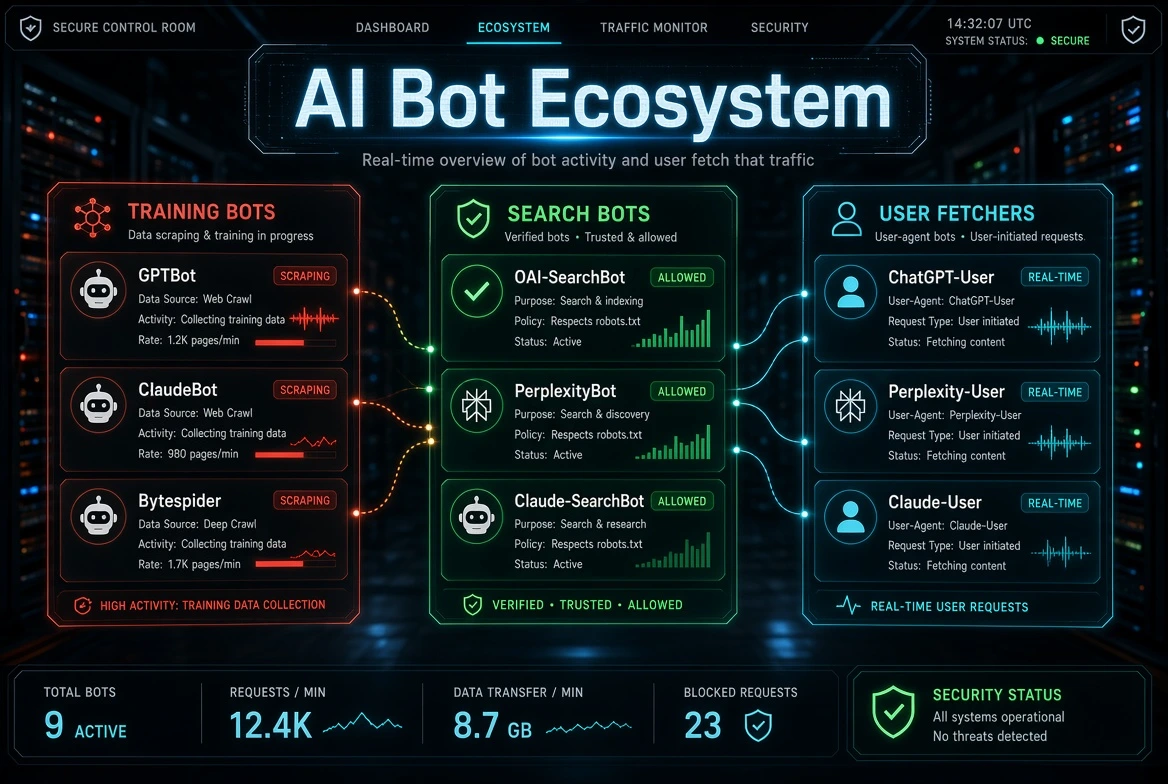
1. Training Crawlers (Model Fine-Tuning)
-
User-Agents:
GPTBot,ClaudeBot,Bytespider -
Purpose: These crawlers scan the public web in bulk to extract training datasets for future foundation models.
-
Impact: Disallowing these crawlers stops AI providers from training future models on your site’s intellectual property. It does not remove you from active AI search responses.
2. Search Indexing Crawlers (AI Search Engines)
-
User-Agents:
OAI-SearchBot,PerplexityBot,Claude-SearchBot -
Purpose: These bots build and refresh real-time web indexes for AI-powered search engines (such as ChatGPT Search and Perplexity AI).
-
Impact: Blocking these crawlers prevents AI tools from surfacing, citing, and linking back to your domain when users ask relevant queries.
3. User-Triggered Fetchers (Live Web Queries)
-
User-Agents:
ChatGPT-User,Perplexity-User,Claude-User -
Purpose: Triggered in real time when a user inputs a specific URL or prompts the AI to fetch live context.
-
Impact: Most user-agents in this category bypass standard
robots.txtdisallow rules because the fetch is directly initiated by an end-user action.
Configuring robots.txt for Generative Engine Optimization
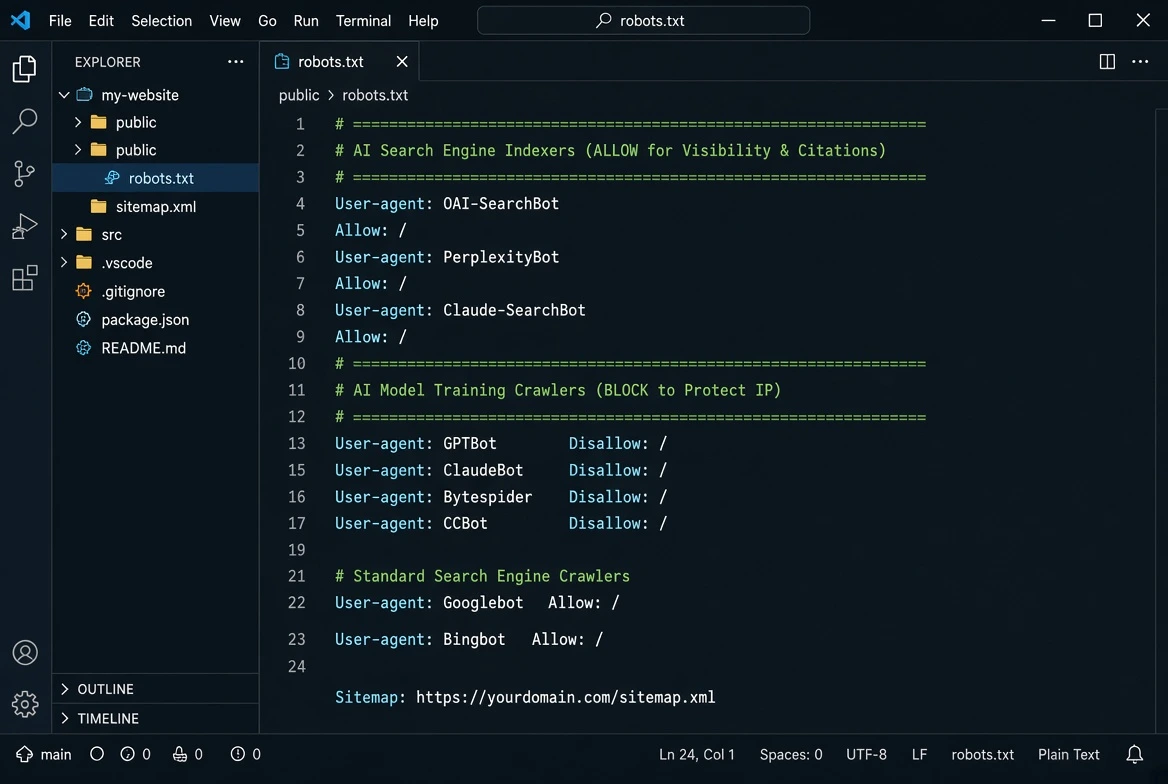
If your business strategy aims to opt-out of AI model training while maximizing brand visibility and citations in AI search, your robots.txt configuration should reflect that exact distinction.
To ensure your structured data is correctly parsed once crawlers access your root domain, implement a standardized llms.txt file setup alongside your access permissions.
Recommended Configuration Blueprint
Copy and deploy the following snippet at your domain root (/robots.txt):
Why robots.txt Alone Is Not Enough: WAF & Edge Protections
Relying solely on robots.txt creates two major operational vulnerabilities:
-
robots.txt is purely advisory: Non-compliant, aggressive scrapers ignore disallow directives entirely.
-
Overly strict WAF rules block good bots: Aggressive Cloudflare or AWS WAF settings (such as “Block Automated Traffic” or strict rate-limiting) often block legitimate
OAI-SearchBotorPerplexityBotrequests at the network edge before they can even read yourrobots.txtfile.
Complementing server-level permissions with semantic metadata ensures seamless entity recognition. Learn how to configure JSON-LD Schema Markup for AI Crawlability to boost citation accuracy.
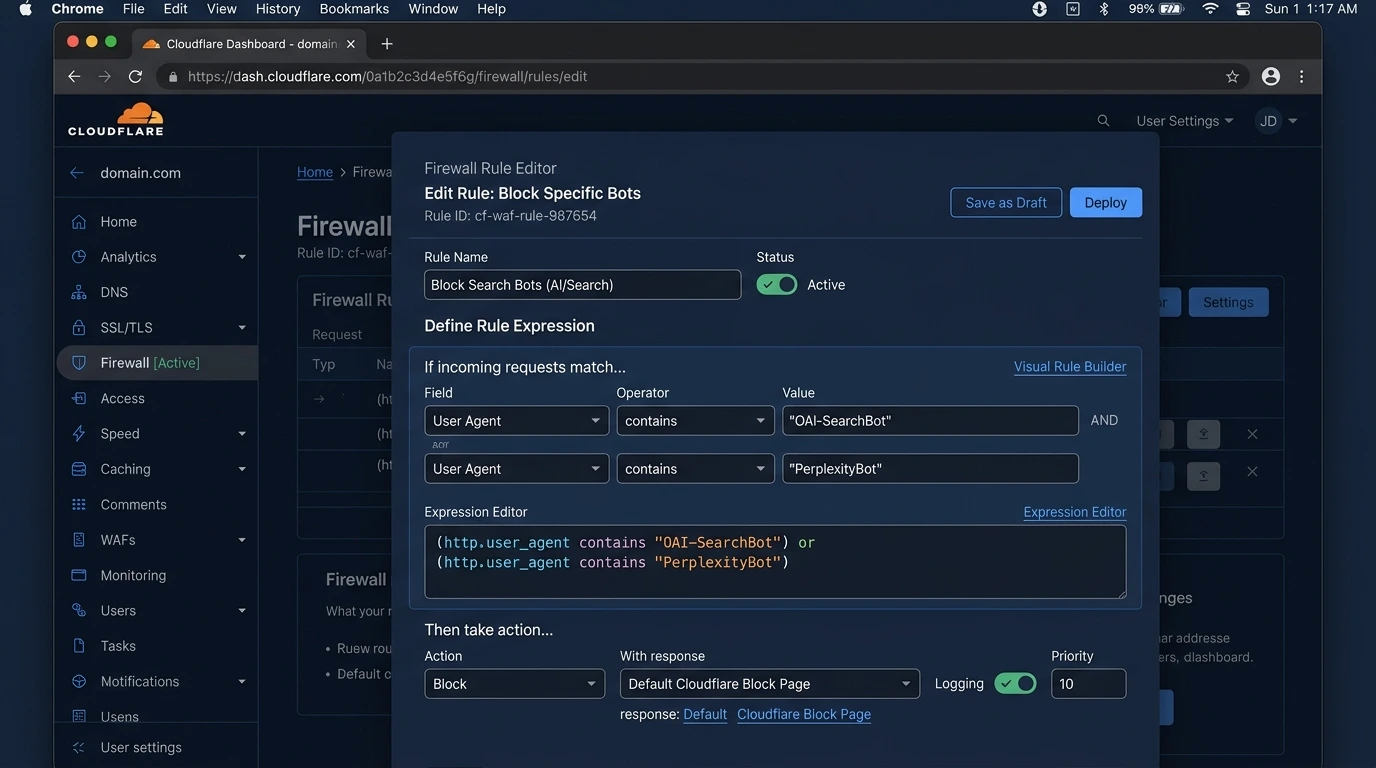
Step-by-Step Cloudflare WAF Setup
To ensure you don’t accidentally drop off AI search indexes, configure your Cloudflare Web Application Firewall (WAF) using custom bot rules:
1. Enable Managed AI Crawlers (Optional Opt-Out)
Navigate to Security > Bots in Cloudflare. You can toggle Block AI Scrapers and Crawlers to automatically restrict training bots. Note: Ensure this does not override your verified bot whitelist for search indexers.
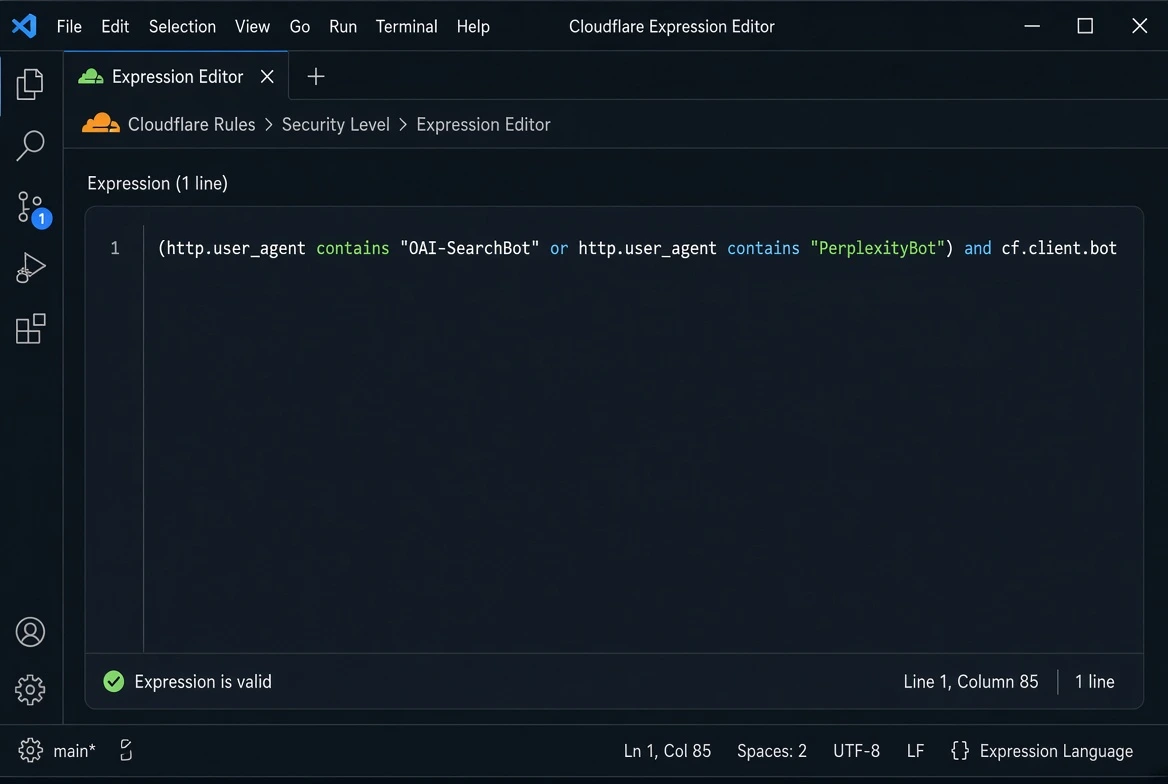
2. Allow Verified AI Search Bots
Create a Custom WAF Expression under Security > WAF > Custom Rules to allow verified AI Search user-agents:
-
Action:
Skip/Allow -
Why: This ensures legitimate search crawlers verified via reverse DNS or Cloudflare’s
cf.client.botpass through your security checks without triggering JavaScript challenges. For official verification ranges, refer to the OpenAI IP Documentation.
3. Challenge Unverified User-Agent Spoofing
Scrapers frequently forge User-Agent strings. To block rogue scrapers pretending to be AI bots, check for IP verification:
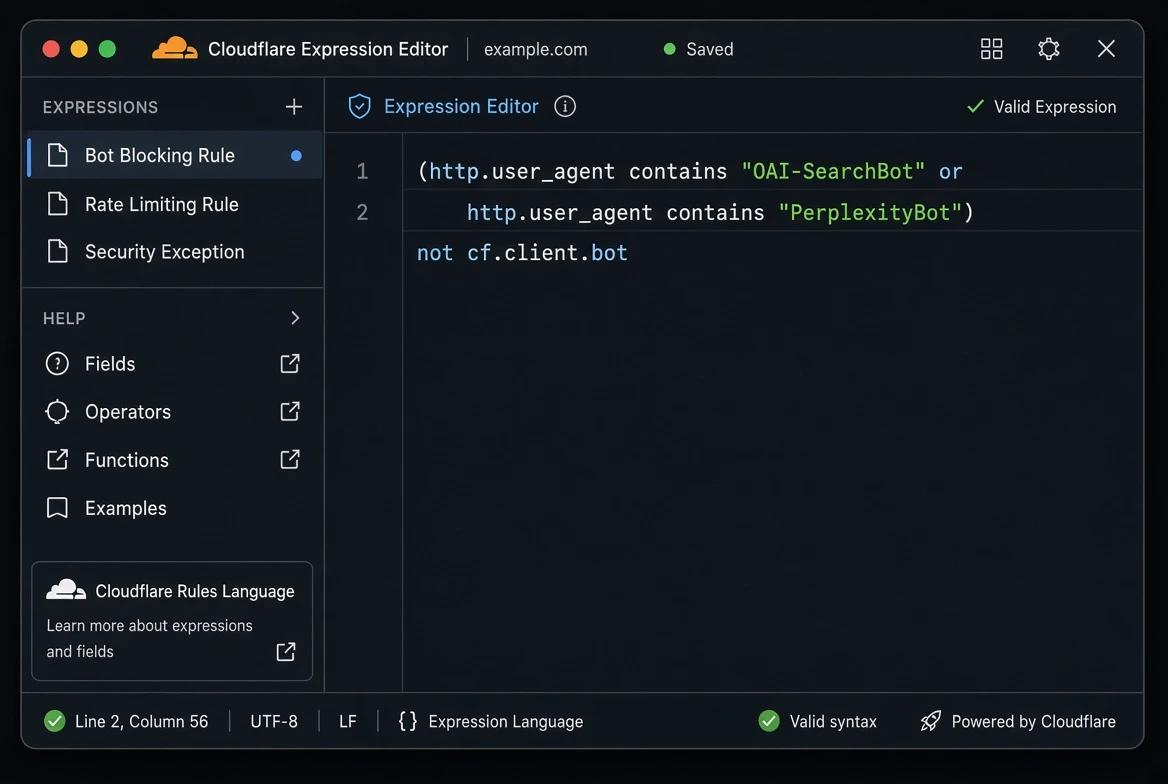
Action: Managed Challenge or Block
How to Test Your AI Crawlability
Deploying rules in robots.txt and WAF without validation can result in silent indexing drops. Verify your infrastructure against three checks:
-
HTTP Response Codes: Ensure
OAI-SearchBotandPerplexityBotreceive an explicit200 OKstatus code on public landing pages rather than403 Forbiddenor429 Too Many Requests. -
IP Verification: Cross-check incoming bot requests against published official IP ranges from OpenAI and Anthropic.
-
WAF Log Inspection: Review your firewall event logs to verify that legitimate search crawlers are not triggering Managed Challenges or Super Bot Fight Mode blocks.
Frequently Asked Questions (FAQs)
1. Will blocking GPTBot remove my website from ChatGPT Search responses?
No. GPTBot is strictly used for crawling web data to train future OpenAI foundation models. ChatGPT Search relies on OAI-SearchBot for real-time indexing and citations. Blocking GPTBot protects your IP while allowing OAI-SearchBot ensures your content remains visible in live search responses.
2. What happens if I block all AI user-agents in Cloudflare WAF?
If you enable aggressive global bot blocking in Cloudflare WAF without exceptions, search indexers like OAI-SearchBot and PerplexityBot will receive 403 Forbidden errors or challenge pages. As a result, AI search engines will stop indexing your domain, leading to a complete loss of visibility in AI-generated answers.
3. Do AI search bots obey the Disallow directives in robots.txt?
Yes, legitimate search crawlers deployed by major AI vendors (OpenAI, Perplexity, Anthropic) respect standard robots.txt protocol. However, unauthorized scrapers or malicious bots may ignore robots.txt, which is why implementing WAF-level rule enforcement is critical.
4. How often do AI search bots crawl websites compared to Googlebot?
AI search bots like OAI-SearchBot and PerplexityBot actively crawl sites based on real-time search demand, prompt refreshes, and RSS/sitemap updates. While Googlebot maintains a steady crawl budget, AI bots frequently target specific high-value pages and citation sources dynamically.
Need an Automated Solution for Your Entire Website?
Debugging WAF rules, user-agent permissions, and HTTP header responses across hundreds of pages can quickly become complex. Managing schema, crawlability, and llms.txt setups across large websites requires continuous monitoring.
Test your domain today using our Free AI Crawlability Checker, or book a custom diagnostic with our Expert AI Visibility Audit.

Zulfiqar Ali
Zulfiqar Ali is an SEO Expert with over 8+ years of experience in AI SEO, Technical SEO, and Local SEO. At LLMrush, he focuses on AI search visibility, GEO, and technical website optimization, delivering practical strategies, technical analysis, and evidence-based guidance.
Follow on LinkedInCheck Other Interesting Posts



Join the Conversation
Share your thoughts, questions, or feedback about this article.